
BioJava:CookBook:Interfaces:Alignments
Biojava can render alignments.
The approach is to take the Sequences you want to render, and insert them into a SimpleAlignment object. The next step is to take a TranslatedSequencePanel and connect your Alignment to it.
What you need to do next is to setup the renderers that will render your alignment. Start with a MultiLineRenderer. To the MultiLineRenderer you connect one AlignmentRenderer for each sequence in the alignment. Each AlignmentRenderer should have the label of the sequence it should render set on it. And in the end you connect a SymbolSequenceRenderer to each AlignmentRenderer. The same SymbolSequenceRenderer can be used for all the AlignmentRenderers.
So for an Alignment with three sequences labeled seq1, seq2 and seq3 the renderer tree would look like this:
__ AlignmentRenderer --- SymbolSequenceRenderer
| label=labelForSeq1
|
|
MultilineRenderer -|-- AlignmentRenderer --- SymbolSequenceRenderer
| label=labelForSeq2
|
|__
AlignmentRenderer --- SymbolSequenceRenderer
label=labelForSeq3
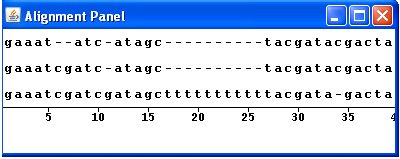
The following is a screenshot of the viewer generated by the AlignmentPanel class:
```java /**
* Class to create an alignment and then display it in a viewer.
*/
//Load Java libraries import java.awt.*; import java.util.*; import javax.swing.*;
//Load BioJava libraries import org.biojava.bio.*; import org.biojava.bio.seq.*; import org.biojava.bio.seq.io.*; import org.biojava.bio.symbol.*; import org.biojava.bio.gui.sequence.*;
public class AlignmentPanel extends JFrame {
//Create references to the sequences
Sequence seq, seq1, seq2, seq3;
//Instantiate the BioJava GUI elements
//TranslatedSequencePanel to hold the renderers
TranslatedSequencePanel tsp = new TranslatedSequencePanel();
//AlignmentRenderer to hold each sequence
AlignmentRenderer render1, render2, render3;
//MultiLineRenderer to allow display of multiple tracks in the TranslatedSequencePanel
MultiLineRenderer multi = new MultiLineRenderer();
//SymbolSequenceRenderer to handle display of the sequence symbols - only one instance is needed
SymbolSequenceRenderer symbol = new SymbolSequenceRenderer();
//RulerRenderer to display sequence coordinates
RulerRenderer ruler = new RulerRenderer();
public AlignmentPanel(){
super("Alignment Panel");
//Create the sequences for the alignment
try {
seq1 = DNATools.createGappedDNASequence("GAAATCGATCGATAGCTTTTTTTTTTTACGATA-GACTAGCATTCCGAC", "seq1");
seq2 = DNATools.createGappedDNASequence("GAAATCGATC-ATAGC----------TACGATACGACTAGCATTCCGAC", "seq2");
seq3 = DNATools.createGappedDNASequence("GAAAT--ATC-ATAGC----------TACGATACGACTAGCATTCCGAC", "seq3");
}
catch (BioException bioe) {
System.err.println("Bioexception: " + bioe);
}
//Add the sequences to a Map
Map<String, Sequence> list = new HashMap();
list.put("1", seq1);
list.put("2", seq2);
list.put("3", seq3);
//Use the Map to create a new SimpleAlignment
SimpleAlignment ali = new SimpleAlignment((Map) list);
//Instantiate the renderers and set the labels and renderers
render1 = new AlignmentRenderer();
render1.setLabel(ali.getLabels().get(0));
render1.setRenderer(symbol);
render2 = new AlignmentRenderer();
render2.setLabel(ali.getLabels().get(1));
render2.setRenderer(symbol);
render3 = new AlignmentRenderer();
render3.setLabel(ali.getLabels().get(2));
render3.setRenderer(symbol);
//Add the alignment renderers to the multi-line renderer
multi.addRenderer(render1);
multi.addRenderer(render2);
multi.addRenderer(render3);
multi.addRenderer(ruler);
//Set the sequence in the TranslatedSequencePanel
tsp.setSequence((SymbolList)ali);
//Set the background colour of the TranslatedSequencePanel
tsp.setOpaque(true);
tsp.setBackground(Color.white);
//Set the renderer for the TranslatedSequencePanel
tsp.setRenderer(multi);
//Set up the display
Container con = getContentPane();
con.setLayout(new BorderLayout());
con.add(tsp, BorderLayout.CENTER);
setSize(400,200);
setLocation(100,100);
setVisible(true);
}
/**
* Main method
*/
public static void main(String args []){
new AlignmentPanel();
}
}
```